 |
Chris De Herrera's Windows CE Website |
|---|---|
About |
|




| By Chris De Herrera Copyright 1998-2007 All Rights Reserved A member of the Talksites Family of Websites Windows and
Windows CE are trademarks of
Microsoft All Trademarks are owned |
ActiveSync & Multiple
Partnerships
By Raj Pillai, Copyright
2003-2004
Version 1.24 Revised 04/11/2004
[an error occurred while processing this directive]
Introduction:
ActiveSync has a limitation of being able to partner your Pocket PC with a maximum of two computers only. The following document explains the steps you need to perform to enable your mobile device to synchronize with two computers. It also explains the limitations that you will encounter if you have more then one partnership.
Setting Up Multiple Partnerships:
- If your device already has a partnership with a Desktop PC, skip
to step 4. Otherwise,
connect the mobile device to the first Desktop PC. The New Partnership wizard will
start automatically.
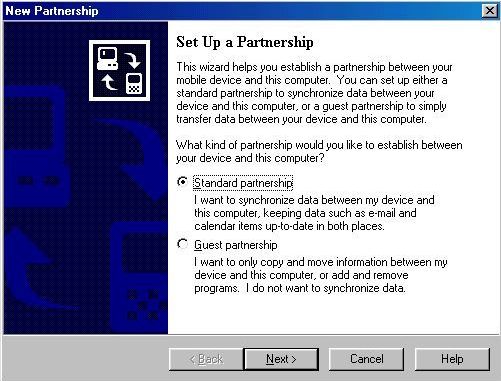
- Follow the directions on the screen.
- After you have set up a partnership and synchronization is complete,
disconnect your device from the first computer. - Connect your device to the second Desktop PC. The New Partnership
Wizard will start. Follow the onscreen instructions.
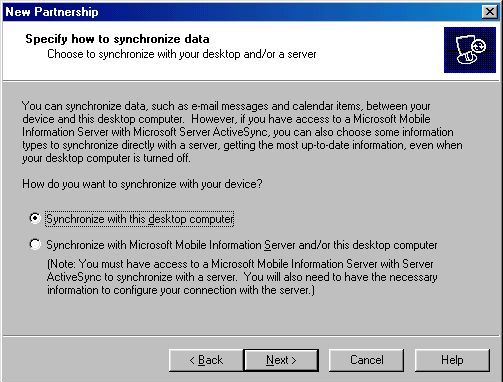
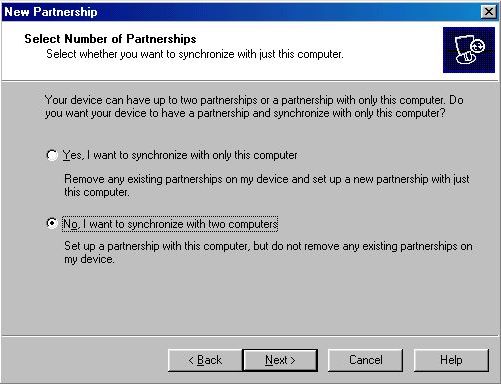
NOTE: In the Select Number of Partnerships dialog box, select No, I want to synchronize with two computers. As seen in the image below:
Limitations:
There are a few limitations with synchronization with two Desktop PCs:
- Only the Inbox of the first partnered computer will synchronize.
- You will not be able to maintain separate appointment schedules in your PIM on the two desktop computers.
- If you are synchronizing Microsoft Money
data, then you will be able to synchronize it only with one computer.
You cannot use Money for Pocket PC to synchronize Money on two different computers.
While setting up the second partnership if you select Inbox, you will see the following screen.

All the other selected information type will synchronize correctly but the Inbox will appeared grayed out and will display an "Attention required" message.
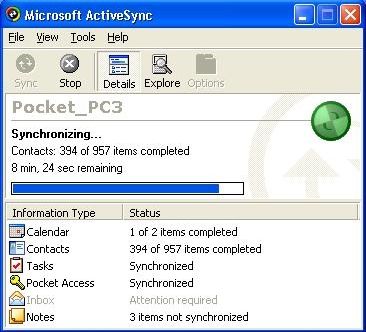
If you want to avoid seeing the "Attention required" message, deselect the option to synchronize Inbox in ActiveSync (click Tools -> Options) on the second partnered computer.
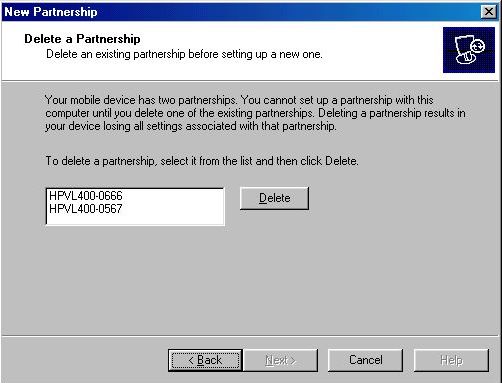
As explained earlier, ActiveSync allows you to have a maximum of two
partnerships. If you try establishing a partnership with a third computer,
then you will be prompted with the following screen during the process of
setting up the partnership.
If you desire to have greater then two partnerships, you will need to
consider using third party software applications. For more information about these
applications visit the following page:
http://www.pocketpcfaq.com/faqs/multiplepartnerships.htm
Read other articles by Raj Pillai
Discuss your Handheld PC, Palm-size PC or Pocket PC needs at Pocket PC FAQ Forums.
[an error occurred while processing this directive]